Claude Code context full? Fix it with these commands
When most people start using Claude Code, they spend their time learning prompts. They search for the best prompts, workflows, productivity tips, agent best practices.
I did the same thing. I learned how to write detailed instructions, structure tasks clearly, and break complex projects into smaller steps. Those skills improved my results.
But after months of using Claude Code on real projects, I found a different problem that almost nobody talks about: context management.
Some of the biggest productivity losses I experienced were not caused by bad prompts or model limitations. They were caused by poor context management. One incident completely changed how I use Claude Code today.
The day my Claude Code session fell apart
I was working on my personal SEO blog. The website had evolved into a larger project with Astro framework, Cloudflare Pages deployment, internationalization, technical SEO optimization, structured data, content architecture, and performance optimization.
Like many developers, I preferred keeping everything inside a single Claude Code session. It felt efficient. The conversation already contained project knowledge, previous decisions, and technical context. Starting a new chat seemed unnecessary.
So I kept adding tasks. First, I asked Claude Code to review page structures. Then I optimized metadata. After that, multilingual configurations. Next came schema markup. Then internal linking. Then component refactoring. Then image optimization. Then documentation generation.
Hour after hour, I added new requests to the same conversation. Initially, everything worked. Then problems appeared.
Claude started forgetting requirements that had been clearly established earlier. It suggested solutions that contradicted previous decisions. Sometimes it revisited problems that had already been solved. In several cases, it generated code that ignored architectural rules we had discussed only a few dozen messages earlier.
The quality decline was not dramatic. It happened gradually. At first I blamed myself. Maybe my prompts were not clear enough. Maybe I had not explained the requirements properly. But after reviewing the conversation, I realized something else was happening.
The session had become enormous. The context window was overloaded. And I had forgotten to use /compact.
Understanding how Claude Code uses context
Many people treat Claude Code like it has unlimited memory. That is not how it works.
Every response Claude generates is based on the context available during that interaction. That context includes user messages, previous responses, tool outputs, file contents, terminal results, project instructions, stored memory, and documentation.
As conversations grow, the amount of information Claude must process also grows. Imagine a project session that lasts several hours. The context might contain system instructions, project rules, CLAUDE.md, source code, terminal logs, previous tool calls, previous explanations, earlier decisions, and the current request.
Everything competes for attention. As more information enters the context window, the model has to determine which information is most relevant. Eventually, some information becomes difficult to prioritize correctly. This is where problems begin.
What context pollution looks like
Most people expect a context problem to produce an obvious error like “Context limit exceeded.” In reality, the warning signs usually appear much earlier.
Claude starts explaining concepts that were already discussed. Requirements established earlier are suddenly ignored. Solutions start contradicting previous decisions. Claude revisits completed tasks. The model becomes more likely to make assumptions rather than relying on established project information. Code quality may remain acceptable, but architectural consistency begins to deteriorate.
These symptoms often appear long before a session reaches its actual context limit. That is why many users do not immediately realize context is the problem.
What /compact actually does
After investigating the issue, I realized I had overlooked one of the most useful Claude Code commands:
/compactMany users misunderstand its purpose. Some believe it deletes information. Others assume it resets the conversation. Neither is correct.
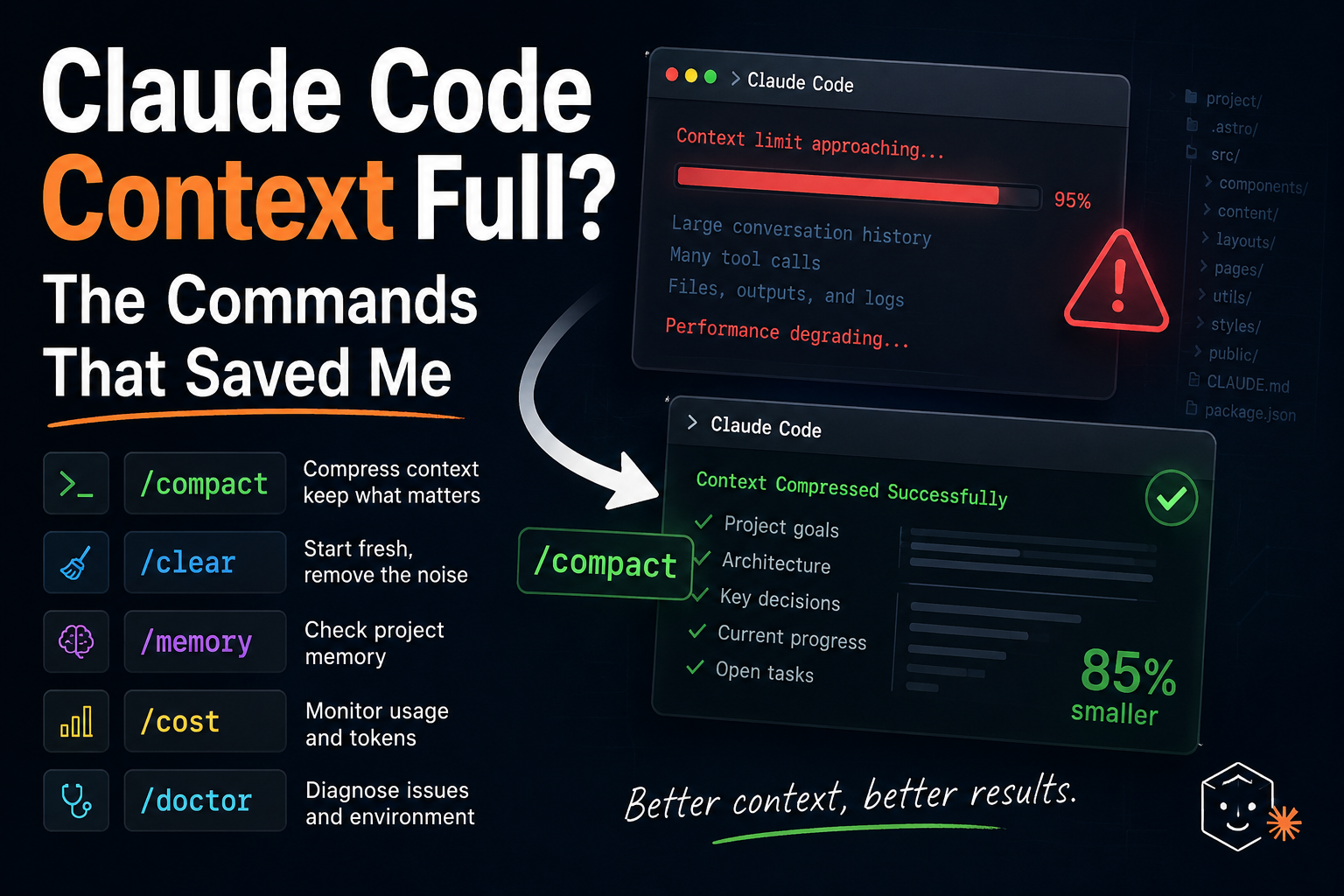
The goal of /compact is to reduce context size while preserving important information. Instead of keeping thousands of messages intact, Claude creates a condensed representation of the conversation.
The compressed summary typically preserves project goals, current architecture, technical decisions, open tasks, important constraints, and progress status. While removing much of the unnecessary conversational history.
Before /compact, you might have 50,000+ tokens of every discussion, explanation, iteration, and correction. After /compact, you get a condensed project summary with architecture decisions, current objectives, and outstanding tasks.
The session becomes significantly lighter while maintaining continuity.
Why I now use /compact aggressively
One mistake I used to make was waiting until the conversation became problematic. That approach is backwards. By the time quality declines, context pollution has already started.
Today I use /compact proactively. After a feature is finished. After a major refactor. After completing technical audits. After generating large documentation.
The goal is not to rescue a damaged session. The goal is to prevent damage from occurring.
The most underrated command: /clear
Another command that improved my workflow is:
/clearMany users continue working inside the same conversation simply because it already contains project history. However, not every task benefits from existing context.
Imagine you are working on SEO audits, blog content, deployment issues, and database optimization all inside one conversation. These topics may have little relationship to one another. Keeping them together increases context complexity without providing meaningful benefits.
When switching to a fundamentally different task, I now start fresh with /clear. The result is faster responses, cleaner reasoning, less confusion, and better focus.
Long-term knowledge should not live in chat history
One of the biggest mistakes beginners make is using conversation history as project documentation. This creates dependency on a single session. If that session becomes corrupted, compressed incorrectly, or inaccessible, valuable information may be lost.
I separate information into two categories.
Long-term knowledge goes in CLAUDE.md, project documentation, architecture documents, and technical specifications. Short-term knowledge stays in the current conversation, active tasks, and temporary debugging work.
This distinction keeps conversations cleaner and makes projects easier to manage.
My current Claude Code workflow
After several painful experiences with context overload, I settled on a workflow that works reliably.
Start with a clean session for new projects using /clear. Avoid importing unnecessary baggage from previous work. Let Claude Code understand project structure, framework choices, deployment methods, and coding standards before assigning complex tasks.
Document important decisions in documentation, not in chat history. Compress frequently with /compact whenever meaningful progress is made. Do not wait for problems.
Review memory periodically with /memory to check that stored information remains accurate and relevant. Monitor usage with /cost because large projects can consume substantial resources over time.
Here is a quick reference for all four commands:
/clear
/compact
/memory
/cost
The biggest productivity lesson I learned
If someone asked me six months ago how to improve Claude Code output quality, I would have talked about prompting. Today my answer would be different.
Prompting matters. Project structure matters. Documentation matters. But context management affects everything.
A brilliant prompt cannot fully compensate for a polluted context window. A well-managed context, however, allows even ordinary prompts to produce consistently strong results.
The turning point in my workflow was not discovering a new prompt framework. It was not a new model. It was not a new extension. It was understanding that AI coding tools perform best when their working environment stays organized.
The command that taught me that lesson was only one word: /compact. And since I started using it regularly, Claude Code has become significantly more reliable during long development sessions.
Next steps
- Install Claude Code on Windows and Mac - Set up Claude Code on your machine
- Claude.md Best Practices & Examples - Configure project instructions for better results
- Claude Code + DeepSeek: CCSwitch Setup - Route Claude Code through DeepSeek for cheaper inference
- Codex Product Design Plugin Guide - Bridge Figma designs to code with AI