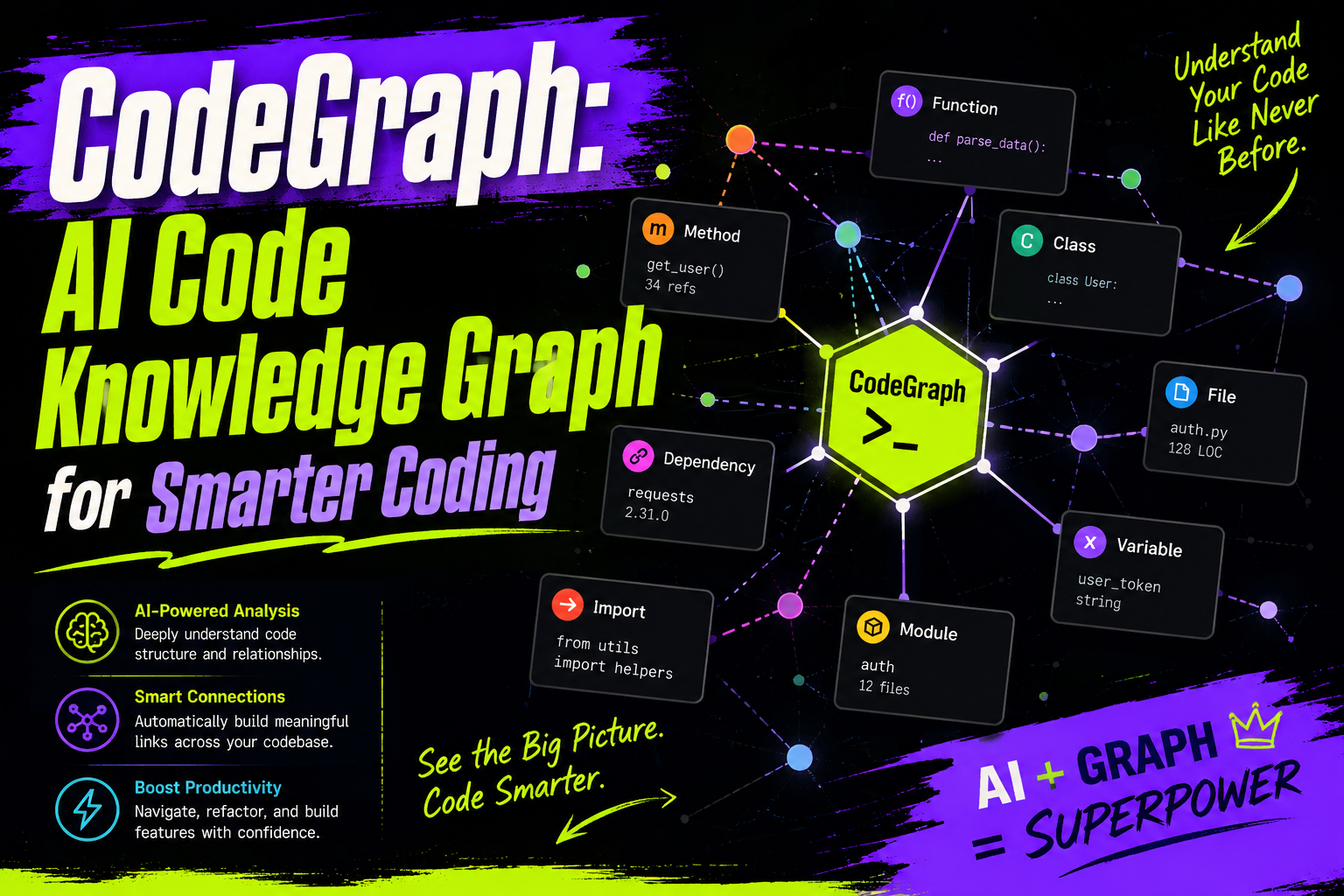
What is CodeGraph?
AI coding tools like Cursor, Claude Code, and GitHub Copilot have changed how we write code. But anyone who has used these tools on a large codebase knows the problem: the AI gets lost.
When a project has thousands of files and complex dependencies, AI assistants either hit context limits or waste API calls scanning files one by one. CodeGraph solves this by building a local code knowledge graph that gives AI a complete view of your codebase.
The tool pre-indexes structural relationships between classes, functions, variables, and dependencies. When you ask your AI assistant a question, it queries this graph instead of scanning files.
Why use CodeGraph?
The benchmark numbers tell the story:
- 58% fewer tool calls (AI stops repeatedly opening files)
- 47% fewer tokens (no more dumping entire files into prompts)
- 16% lower cost (fewer tokens and calls mean cheaper bills)
- 22% faster responses (pre-built context speeds up answers)
CodeGraph runs entirely on your local machine. Your code never leaves your infrastructure. There are no API keys, no external services, just a SQLite database.
How CodeGraph works
Traditional AI assistants discover code by reading files on demand. You ask a question, the AI greps through directories, opens ten files, and pieces together an answer. This is slow and expensive.
CodeGraph flips the approach. It runs static analysis in the background, mapping every entity into a queryable graph. When the AI needs to answer a question, it performs one graph query and gets the complete context.
Core features
Smart context building
CodeGraph packages entry points, symbols, and code snippets into a single response. Your AI assistant gets exactly what it needs without scanning files.
Full-text search
The built-in SQLite FTS5 engine handles fast code search across large repositories. Both fuzzy queries and exact matches resolve in milliseconds.
Impact analysis
Before changing code, you can trace the blast radius:
- Callers: which functions depend on this module
- Callees: which services this function triggers
- Change propagation: which endpoints or views break if you change a signature
Automatic synchronization
CodeGraph watches your files using native OS events. When you edit code, the graph updates in the background. No manual sync commands needed.
Framework-aware routing
CodeGraph recognizes routing files in 17+ frameworks. It maps HTTP methods to their controllers in Django, Flask, FastAPI, Express, NestJS, Laravel, Rails, Spring, and more.
Mobile bridging
For React Native or Expo projects, CodeGraph tracks cross-language dependencies between JavaScript and native Swift/Kotlin modules.
Supported languages and frameworks
| Category | Languages | Frameworks |
|---|---|---|
| Frontend and mobile | TypeScript, JavaScript, Swift, Kotlin, Svelte, Vue, Astro, Dart | React Router, SvelteKit, Vue Router, Astro, Expo, React Native |
| Backend and systems | Python, Go, Rust, Java, C#, PHP, Ruby, C, C++, Scala, Lua | Django, Flask, FastAPI, Express, NestJS, Laravel, Rails, Spring |
Installation
CodeGraph bundles its own runtime. You do not need Node.js installed.
macOS or Linux:
curl -fsSL https://raw.githubusercontent.com/colbymchenry/codegraph/main/install.sh | shWindows (PowerShell):
irm https://raw.githubusercontent.com/colbymchenry/codegraph/main/install.ps1 | iexOr use npm:
npm i -g @colbymchenry/codegraphAfter installation, open a new terminal and connect to your AI tools:
codegraph installThis detects and configures Claude Code, Cursor, Codex, and other supported tools automatically.
How to use CodeGraph
Initialize your project
Navigate to your project root and run:
cd your-project
codegraph init
This scans your codebase, builds the graph, and creates a local .codegraph/ directory.
Auto-sync stays fresh
From this point, CodeGraph watches your files. Edit code, switch branches, or pull changes, and the graph updates automatically. No manual intervention required.
Query through your AI assistant
Your AI assistant can now use the codegraph_explore tool. Try asking:
- “Find all callers of this payment handler function”
- “If I change this data schema, which pages break?”
- “Show me the dependency map for this directory”
Benchmark results
| Project | Language | Files | Token reduction | Tool call reduction | Cost savings |
|---|---|---|---|---|---|
| VS Code | TypeScript | ~10,000 | -64% | -81% | -18% |
| Django | Python | ~3,000 | -60% | -77% | -8% |
| OkHttp | Java | ~645 | -54% | -50% | -25% |
| Average | Mixed | Mixed | -47% | -58% | -16% |
Without CodeGraph, an AI agent reads ten files to find one function. With CodeGraph, it queries the graph and gets the answer directly.
Related articles
- Install Claude Code: Windows and Mac Guide - Set up Claude Code on your machine
- Claude Code Context Full? Use These Commands - Manage context and avoid overload
- Claude.md Best Practices and Examples - Configure project instructions for Claude Code