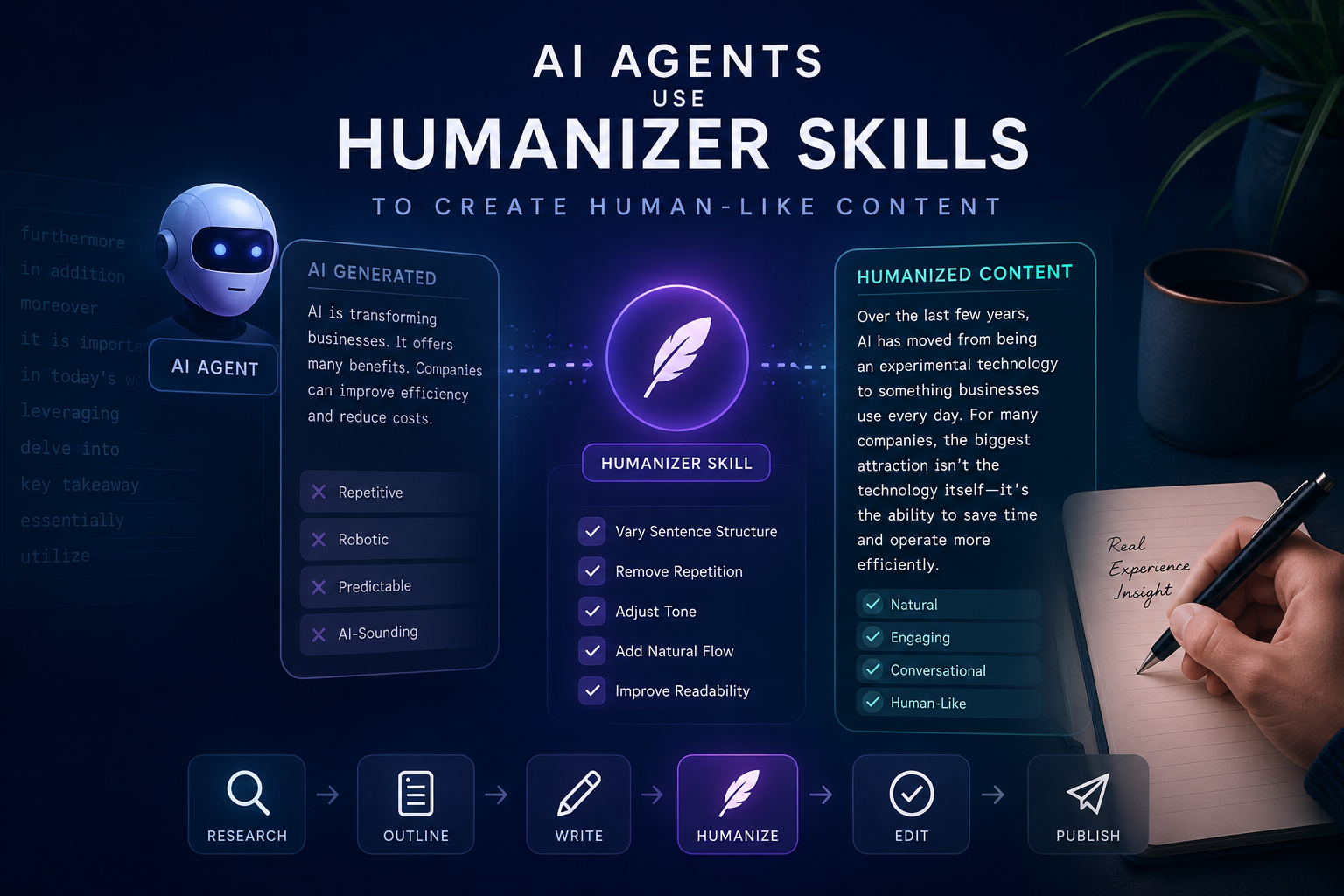
Why AI-Generated Content Still Sounds Like a Robot
You have seen it. You ask an AI to write a blog post, and it comes back with sentences like “This groundbreaking approach underscores the pivotal role of innovative solutions in the evolving landscape of digital transformation.” Nobody talks like that. Nobody wants to read that.
The problem is not that AI cannot write. It produces grammatically correct, well-structured text faster than any human. The problem is that AI has recognizable writing habits. These patterns, sometimes called “AI slop,” make content feel hollow even when the information is accurate.
Humanizer Skills fix this. A Humanizer Skill is a set of rules and workflows that an AI Agent applies to its own output. It turns robotic text into something a person would actually write.
What Are Humanizer Skills
A Humanizer Skill is an instruction set, usually a Claude Code Skill or similar plugin, that teaches an AI Agent to detect and fix its own writing patterns. The idea comes from Wikipedia’s “Signs of AI writing” guide, which lists over 30 patterns that mark text as machine-generated.
The skill works from a checklist. It scans the text for each known pattern, flags violations, and rewrites them while keeping the original meaning. It does not guess what sounds human. It follows a numbered list of specific problems and applies specific fixes.
How It Works
When you load a Humanizer Skill into Claude Code, the Agent gets access to a pattern library. Each entry contains trigger words and phrases that signal AI involvement, before-and-after examples showing the transformation, and rules for replacement that maintain the original intent.
The Agent runs your text through this checklist, identifies violations, and produces a rewritten version. The result reads like something a human wrote because it follows the same patterns real writers use.
Why AI-Generated Content Sounds Robotic
AI writing patterns come from how language models are trained. The models learn statistical probabilities of word sequences, and certain patterns dominate the training data. Here are the main problems.
Promotional and Advertisement Language
AI defaults to hype words. “Groundbreaking,” “stunning,” “rich cultural heritage,” “nestled in the heart of.” These words show up in press releases and marketing copy, which make up a large portion of training data. When an AI describes a product, a place, or an idea, it reaches for the same promotional vocabulary.
Before (AI):
Nestled within the breathtaking region of Gonder in Ethiopia, Alamata Raya Kobo stands as a vibrant town with a rich cultural heritage and stunning natural beauty.
After (Humanized):
Alamata Raya Kobo is a town in the Gonder region of Ethiopia, known for its weekly market and 18th-century church.
Superficial -ing Analyses
AI tacks on participial phrases to add fake depth. “Highlighting the importance,” “showcasing the innovation,” “reflecting the community’s values.” These phrases sound analytical but say nothing specific.
Before (AI):
The temple’s color palette of blue, green, and gold resonates with the region’s natural beauty, symbolizing Texas bluebonnets, the Gulf of Mexico, and the diverse Texan landscapes, reflecting the community’s deep connection to the land.
After (Humanized):
The temple uses blue, green, and gold colors. The architect said these were chosen to reference local bluebonnets and the Gulf coast.
Overused AI Vocabulary
Certain words appear far more frequently in AI-generated text than in human writing. The list includes: actually, additionally, crucial, delve, emphasize, foster, garner, highlight, interplay, intricate, key, landscape, pivotal, showcase, tapestry, testament, underscore, vibrant.
When you see five of these in one paragraph, you are almost certainly reading AI output.
Before (AI):
Additionally, a distinctive feature of Somali cuisine is the incorporation of camel meat. An enduring testament to Italian colonial influence is the widespread adoption of pasta in the local culinary landscape, showcasing how these dishes have integrated into the traditional diet.
After (Humanized):
Somali cuisine also includes camel meat, which is considered a delicacy. Pasta dishes, introduced during Italian colonization, remain common, especially in the south.
Em Dash Overuse
AI uses em dashes excessively. They appear in pairs to insert asides, creating a rhythm that feels formulaic. Human writers use em dashes occasionally. AI uses them in almost every long sentence.
Before (AI):
The new policy — announced without warning — affects thousands of workers. The changes — long overdue according to critics — will take effect immediately.
After (Humanized):
The new policy, announced without warning, affects thousands of workers. The changes, long overdue according to critics, will take effect immediately.
The Rule of Three
AI loves grouping things in threes. “Innovation, inspiration, and insight.” “Keynote sessions, panel discussions, and networking opportunities.” This pattern appears because trilogies are common in training data, and the model overgeneralizes.
Before (AI):
The event features keynote sessions, panel discussions, and networking opportunities. Attendees can expect innovation, inspiration, and industry insights.
After (Humanized):
The event includes talks and panels. There is also time for informal networking between sessions.
Complete AI Agent Workflow with Humanizer
This is how a typical AI Agent workflow looks with Humanizer Skills added:
┌─────────────────────────────────────────────────┐
│                  USER INPUT                      │
│         "Write a blog post about X"              │
└──────────────────────┬──────────────────────────┘
                       │
                       ▼
┌─────────────────────────────────────────────────┐
│              AI AGENT (Claude Code)              │
│                                                  │
│  1. Understand the request                       │
│  2. Research the topic                           │
│  3. Generate initial draft                       │
└──────────────────────┬──────────────────────────┘
                       │
                       ▼
┌─────────────────────────────────────────────────┐
│            HUMANIZER SKILL (Layer 1)             │
│                                                  │
│  Scan for 30+ AI writing patterns:              │
│  ├── Promotional language                        │
│  ├── Superficial -ing analyses                   │
│  ├── Overused AI vocabulary                      │
│  ├── Em dash overuse                             │
│  ├── Rule of three                               │
│  ├── Passive voice                               │
│  ├── Vague attributions                          │
│  ├── Negative parallelisms                       │
│  └── ...22 more patterns                         │
│                                                  │
│  Flag violations → Rewrite flagged sections      │
└──────────────────────┬──────────────────────────┘
                       │
                       ▼
┌─────────────────────────────────────────────────┐
│          VOICE CALIBRATION (Layer 2)             │
│                                                  │
│  Match author's existing writing style:         │
│  ├── Sentence length patterns                    │
│  ├── Word choice level                           │
│  ├── Punctuation habits                          │
│  └── Transition style                            │
└──────────────────────┬──────────────────────────┘
                       │
                       ▼
┌─────────────────────────────────────────────────┐
│           CONTENT REFINEMENT (Layer 3)           │
│                                                  │
│  ├── Add personality and opinions                │
│  ├── Vary sentence rhythm                        │
│  ├── Remove soulless, Wikipedia-style tone       │
│  └── Ensure the text has a human pulse           │
└──────────────────────┬──────────────────────────┘
                       │
                       ▼
┌─────────────────────────────────────────────────┐
│               FINAL OUTPUT                       │
│                                                  │
│  Clean, human-like content ready for             │
│  publishing, SEO optimization, or delivery       │
└─────────────────────────────────────────────────┘
The workflow runs in three layers. The first catches obvious AI patterns. The second calibrates the voice to match the author. The third adds personality.
Implementing Humanizer Skills in Claude Code
Setting up a Humanizer Skill in Claude Code takes about five minutes.
Step 1: Install the Skill
Clone the Humanizer repository into your Claude Code skills directory:
git clone https://github.com/your-repo/humanizer.git ~/.claude/skills/humanizerOr install it manually by downloading SKILL.md and placing it in your skills folder:
mkdir -p ~/.claude/skills/humanizer
# Place SKILL.md in this directory
Step 2: Verify Installation
Claude Code should automatically detect the new skill. You can verify by asking Claude:
What skills are available?If humanizer appears in the list, the installation worked.
Step 3: Use the Skill
There are two ways to use the Humanizer.
Automatic: Add a rule to your CLAUDE.md file that tells Claude to run the Humanizer on all long-form content:
# CLAUDE.md

When generating blog posts, articles, or any content longer than 500 words,
always run the humanizer skill on the final output before delivering it.
On-demand: When you want to humanize specific text, invoke the skill directly:
Humanize this text: [paste your AI-generated content here]Step 4: Provide a Writing Sample (Optional)
For best results, give the Humanizer a sample of your own writing. This lets it match your voice instead of applying a generic style:
Humanize this text. Here's a sample of my writing for voice matching:
[paste 2-3 paragraphs of your previous work]
The skill analyzes your sentence patterns, word choices, and punctuation habits, then applies those patterns to the rewrite.
Practical Humanizer Prompt Example
You can copy and paste this prompt into Claude Code to use the Humanizer as a one-shot content refinement tool:
## Humanizer Refinement Prompt

You are a writing editor. I will give you AI-generated text. Your job:

1. Read the text carefully
2. Identify every instance of these AI patterns:
   - Promotional language (groundbreaking, stunning, rich, vibrant)
   - Superficial -ing phrases (highlighting, showcasing, reflecting)
   - Overused AI words (crucial, delve, foster, interplay, tapestry)
   - Em dashes used for asides
   - Rule of three groupings
   - Passive voice where active is clearer
   - Vague attributions (experts say, studies show)
   - Negative parallelisms (not only...but also)
   - Bolded inline headers in lists

3. Rewrite every flagged section. Replace AI patterns with
   natural alternatives. Keep the original meaning.
4. Vary sentence length. Mix short punchy sentences with
   longer ones.
5. Add opinions or first-person perspective where appropriate.
6. Remove all em dashes. Use commas, periods, or colons instead.
7. Do NOT add new content. Only rewrite what exists.

Output the cleaned text with no commentary.
Example Transformation
Input (AI-generated):
In today’s rapidly evolving digital landscape, content creators face a crucial challenge. Not only must they produce high-quality material, but they must also ensure it resonates with their target audience. This groundbreaking approach to content optimization showcases the pivotal role of human-AI collaboration, fostering a new era of digital communication that underscores the importance of authentic voice.
Output (after Humanizer):
Content creators have a hard problem right now. They need to produce good material that actually connects with readers. The best results come from combining AI efficiency with human judgment. The AI handles the first draft; the human makes it sound like a person wrote it.
The two versions say the same thing. The first uses every AI pattern: “rapidly evolving digital landscape,” “crucial challenge,” “not only…but also,” “groundbreaking,” “showcases,” “fostering,” “underscores.” The second says it in plain language.
Best Practices
Start with Quality Input
The Humanizer fixes writing patterns, not content problems. If your AI draft has factual errors, missing information, or weak arguments, the Humanizer will not fix those. Get the content right first, then humanize the language.
Provide Writing Samples
Voice calibration makes a real difference. Without a sample, the Humanizer produces clean but generic text. With a sample, it produces text that sounds like you. Take two minutes to paste a paragraph of your previous work.
Use It as a Final Step
Run the Humanizer after all content decisions are made. Do not humanize a draft that you plan to restructure or add sections to. Humanize last.
Review the Output
The Humanizer is a tool, not a replacement for your judgment. Read the output. Does it sound like you? Make small adjustments where needed.
Save Your Prompt Templates
If you find a combination of Humanizer settings and voice instructions that works well for your content, save it. Create a template prompt that you can reuse across posts.
Common Mistakes
Running Humanizer Too Early
If you humanize a first draft and then rewrite half of it, you wasted the humanization step. Write the full draft, make all content changes, then humanize the final version.
Ignoring Voice Calibration
The default Humanizer output is clean but impersonal. Without a writing sample, every post sounds the same. Spend the extra minute to provide a sample of your voice.
Over-Reliance on the Tool
The Humanizer catches known patterns. It does not catch every instance of robotic writing, and it does not guarantee the output sounds natural. Use it as one layer in your editing process, not the entire process.
Humanizing Short Text
The Humanizer works best on longer content, 500 words or more. For short captions, titles, or meta descriptions, the overhead is not worth it. Edit those by hand.
Forgetting to Update CLAUDE.md
If you want the Humanizer to run automatically on all content, add the rule to your CLAUDE.md file. Without this, you have to remember to invoke the skill manually every time.
The Bigger Picture
AI writing tools get better every month. The models produce cleaner text with fewer obvious patterns. But the gap between AI output and human writing has not closed, and it may never close entirely. Human writing carries opinion, uncertainty, humor, and personality in ways that statistical models struggle to replicate.
Humanizer Skills bridge that gap. They take the speed and knowledge of AI and add the voice and judgment of a human writer. The result is content that is fast to produce, accurate, and pleasant to read.
For developers building with Claude Code, Cursor, or similar tools, the Humanizer is not optional. It is the difference between content that readers skip and content that readers finish.
Key Takeaways
- AI writing has 30+ detectable patterns that readers recognize instantly
- Humanizer Skills are structured rule sets that detect and fix these patterns
- Voice calibration with a writing sample produces the best results
- Run the Humanizer as a final step, not during drafting
- The tool works within Claude Code as a skill, invoked automatically or on-demand
- Human-AI collaboration produces better content than either alone
The goal is not to trick anyone into thinking a human wrote something. The goal is to produce content that is clear, useful, and readable. Humanizer Skills make that possible without sacrificing the speed and scale that AI provides.
Related articles:
- Install Claude Code — Set up Claude Code on your machine
- Configure Claude.md — Set up project instructions for better results
- Add vision capabilities — Enable image recognition in Claude Code
- GEO SEO complete guide — Optimize your content for AI search engines