AI Agent Architecture: Models, Memory, Tools, Planning
Artificial intelligence has evolved rapidly over the last few years.
Large Language Models (LLMs) are no longer used only as chatbots. Instead, they have become the reasoning engine behind increasingly capable AI agents that can search the web, write code, browse files, execute commands, call APIs, remember previous work, and even collaborate with other agents.
Because of this evolution, many people mistakenly believe that an AI agent is simply “an LLM with tools.”
In reality, that description leaves out most of the system.
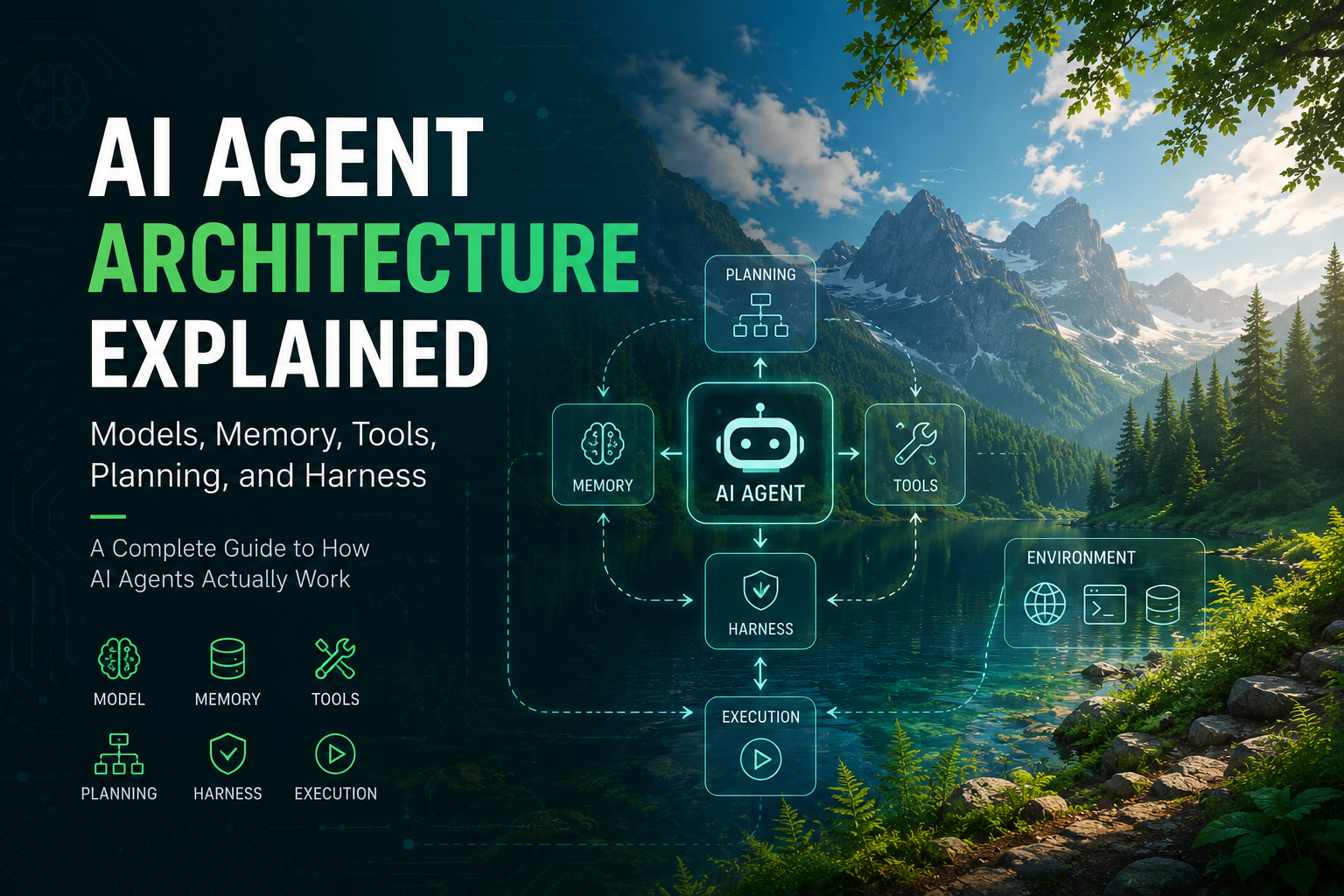
Modern AI agents are software systems composed of multiple independent components that cooperate through an execution loop. The language model is only one piece of the architecture.
This article explores how modern AI agents are built, why each component exists, and how the entire system works together.
What Is an AI Agent?
An AI agent is a software system capable of autonomously completing tasks by repeatedly observing its environment, reasoning about the current state, selecting actions, executing those actions, and evaluating the results until the objective is achieved.
Unlike traditional chatbots that generate only one response per prompt, an agent continuously interacts with external systems.
A simplified workflow looks like this:
Goal
↓
Observe
↓
Reason
↓
Plan
↓
Use Tools
↓
Receive Results
↓
Update Memory
↓
Repeat
↓
Complete Task
This continuous loop is what distinguishes an agent from a single LLM response.
The Core Components of an AI Agent
Although implementations differ, nearly every production-grade AI agent contains several common modules.
+------------------------------------------------+
|                  User Goal                     |
+------------------------------------------------+
                      ↓
+-------------------------+
|         Harness         |
+-------------------------+
                      ↓
+-------------------------+
|          LLM            |
+-------------------------+
                      ↓
+-----------------------------------------------+
|  Planning | Memory | Tools | Context Builder  |
|           Prompt Manager | State Manager      |
+-----------------------------------------------+
                      ↓
                Environment
Let’s examine each component.
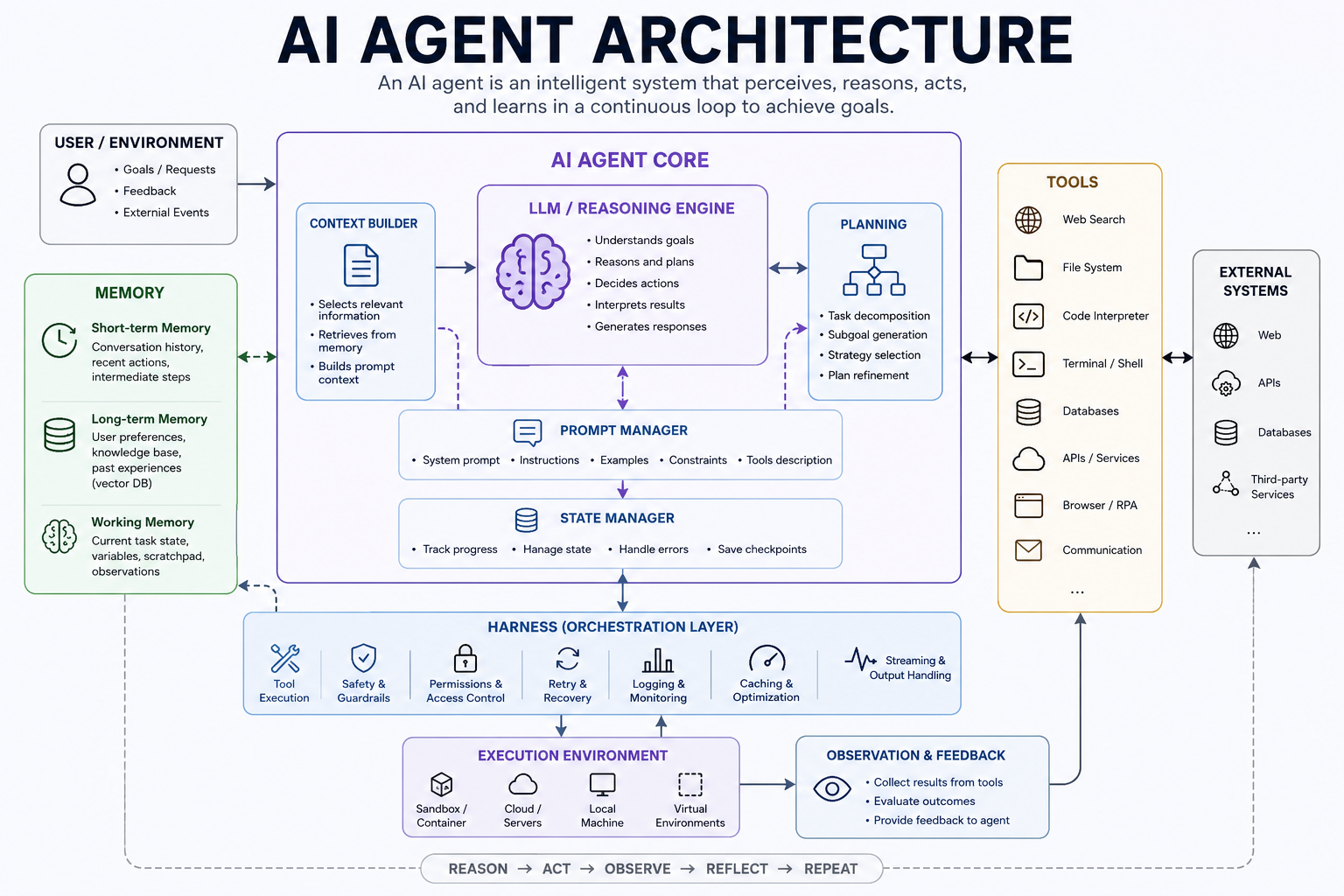
1. The Model (LLM)
The language model serves as the cognitive engine of the agent.
Its responsibilities include:
- reasoning
- planning
- generating natural language
- deciding which tool to call
- interpreting tool outputs
- revising previous decisions
Popular models include:
- GPT-5.5
- Claude 4
- Gemini 3
- DeepSeek
- Qwen
- Llama
An important point is that the model itself cannot:
- browse files
- search the Internet
- execute Python
- access databases
- remember long histories
Those capabilities come from other components.
2. Memory
Memory allows an agent to operate beyond the context window of a single conversation.
Modern agents typically use three different memory systems.
Short-Term Memory
Stores the current conversation.
Usually consists of:
- recent messages
- intermediate reasoning
- current task state
- temporary variables
Long-Term Memory
Persists information across sessions.
Examples include:
- user preferences
- coding style
- previous projects
- documentation
- retrieved knowledge
Most systems implement long-term memory using vector databases.
Examples:
- Pinecone
- Chroma
- Weaviate
- Milvus
Working Memory
Working memory stores temporary observations while solving a task.
For example:
- search results
- current code edits
- execution outputs
- API responses
This memory exists only during the current execution.
3. Tools
Without tools, an LLM can only generate text.
Tools allow an agent to interact with the real world.
Examples include:
- Web Search
- Browser
- Python
- Terminal
- Git
- Database
- REST APIs
- File System
- Calendar
Tool calling generally follows this sequence:
User asks a question
      ↓
LLM selects a tool
      ↓
Harness executes tool
      ↓
Tool returns structured data
      ↓
LLM analyzes result
      ↓
Repeat if necessary
Notice that the model never executes tools directly.
The harness performs all execution.
4. Planning
Planning determines how complex tasks are decomposed.
Instead of solving everything in one response, an agent creates smaller subtasks.
For example:
Build a website
      ↓
Design pages
      ↓
Generate components
      ↓
Write code
      ↓
Run tests
      ↓
Fix bugs
      ↓
Deploy
Planning techniques include:
- Task decomposition
- Tree of Thoughts
- Graph planning
- DAG execution
- Reflection
- Recursive planning
Advanced agents continuously update their plans during execution.
5. Context Engineering
Context engineering determines what information the model receives.
Since context windows are limited, agents must carefully decide:
- which files to include
- which documentation to load
- what memory to retrieve
- which tool outputs matter
- how much history to preserve
Poor context engineering leads to hallucinations and degraded reasoning.
Many modern AI coding assistants spend more effort constructing context than generating text.
6. Harness Engineering
One of the least discussed but arguably most important components of modern AI agents is the harness.
The harness is the orchestration layer that surrounds the language model.
Instead of producing intelligence itself, it manages the execution environment that enables the model to work effectively.
A typical harness is responsible for:
- building prompts
- selecting context
- executing tools
- managing permissions
- maintaining execution state
- handling retries
- parsing structured outputs
- enforcing safety rules
- streaming responses
- coordinating multiple models
- caching results
- recording logs
The harness essentially functions as the operating system of an AI agent.
Without it, the language model would only generate text and would have no reliable mechanism to interact with external systems.
Many well-known AI products including Claude Code, Cursor, Devin, OpenHands, Codex CLI, and OpenAI Codex derive much of their capability not only from powerful models, but also from sophisticated harness engineering.
7. Prompt Management
Production agents rarely rely on a single prompt.
Instead, prompts are assembled dynamically from multiple sources, such as:
- system instructions
- developer instructions
- retrieved memory
- documentation
- user requests
- tool outputs
- execution history
This dynamic composition allows the agent to adapt its behavior to different tasks while maintaining consistent constraints and goals.
8. State Management
An agent needs to know what has already happened during execution.
State management tracks information such as:
- completed tasks
- pending actions
- tool results
- errors
- checkpoints
- execution progress
Without state management, the agent may repeat work or lose track of long-running tasks.
9. Observation and Feedback
Every tool invocation produces observations.
The agent analyzes those observations before deciding the next action.
For example:
Run Tests
      ↓
12 Failed Tests
      ↓
Analyze Errors
      ↓
Modify Code
      ↓
Run Tests Again
      ↓
0 Failed Tests
This observe-act-observe loop is fundamental to autonomous behavior.
The Complete Agent Loop
Most modern agents follow a repeated execution cycle:
Receive Goal
      ↓
Build Context
      ↓
Reason
      ↓
Create Plan
      ↓
Choose Tool
      ↓
Execute Tool
      ↓
Observe Result
      ↓
Update Memory
      ↓
Revise Plan
      ↓
Repeat
      ↓
Finish Task
This iterative process allows agents to adapt dynamically instead of relying on a single static response.
Agent vs Workflow vs Automation vs Chatbot
Understanding the differences between these concepts helps clarify what makes agents unique.
Chatbots
Chatbots generate one response per prompt. They have no memory between conversations, cannot execute tools, and do not maintain state. Each interaction starts fresh.
Automation
Automation follows predefined scripts. If-then rules handle specific scenarios. When conditions change, automation breaks. There is no reasoning or adaptation.
Workflows
Workflows execute sequences of steps. They can include branching logic and parallel execution. However, they follow predetermined paths. A workflow cannot decide mid-execution to try a different approach.
Agents
Agents observe their environment, reason about current state, make decisions, execute actions, and learn from results. They adapt dynamically. When something fails, they try alternative approaches.
The key difference is autonomy. Agents decide what to do next based on current observations, not predefined rules.
Agent Framework Comparison
Several frameworks help developers build multi-agent systems.
LangGraph
LangGraph from LangChain provides graph-based agent orchestration. Agents are nodes in a directed graph. Edges represent possible transitions. This approach works well for complex workflows with conditional branching.
AutoGen
Microsoft’s AutoGen focuses on conversational agents. Multiple agents discuss problems, propose solutions, and refine outputs through dialogue. This works well for tasks requiring debate and consensus.
CrewAI
CrewAI organizes agents into crews with specific roles. A research crew might include a researcher, fact-checker, and editor. Each agent has defined responsibilities and tools.
OpenAI Agents SDK
OpenAI’s Agents SDK provides built-in tools for common agent patterns. It includes memory management, tool execution, and conversation handling. The SDK works with OpenAI models but follows similar patterns to other frameworks.
Each framework has tradeoffs. LangGraph offers flexibility. AutoGen enables collaborative problem-solving. CrewAI simplifies role-based organization. The OpenAI SDK reduces boilerplate.
MCP (Model Context Protocol) in Agent Architecture
MCP standardizes how agents interact with external tools and data sources.
Before MCP, each tool integration required custom code. Web search, database access, file operations, and API calls each needed unique implementations. MCP provides a universal interface.
An MCP server exposes tools and resources through a standard protocol. Agents connect to MCP servers and discover available capabilities automatically. This reduces integration complexity significantly.
MCP also enables tool reuse. A well-designed MCP server works with any compliant agent. Developers build tools once and share them across the ecosystem.
For agent architecture, MCP means the tool layer becomes modular. Agents can add capabilities by connecting to new servers without code changes. The harness handles MCP communication, keeping the LLM focused on reasoning.
A2A (Agent-to-Agent) Protocol
A2A enables direct communication between agents without human mediation.
In multi-agent systems, agents often need to coordinate. One agent might research a topic, another writes code, a third reviews the output. A2A provides the communication layer for these interactions.
The protocol defines message formats, discovery mechanisms, and task delegation patterns. Agent A can announce its capabilities. Agent B can request specific help. Agent A completes the subtask and returns results.
A2A differs from MCP. MCP connects agents to tools. A2A connects agents to agents. Together, they create flexible agent ecosystems where capabilities compose dynamically.
For developers, A2A means agents become building blocks. Complex systems emerge from simple agents communicating through standardized protocols.
Memory Retrieval (RAG) vs Agent Memory
Agent memory and RAG serve different purposes despite some overlap.
RAG (Retrieval-Augmented Generation)
RAG retrieves relevant documents to answer specific questions. A user asks about a topic. The system searches a knowledge base. Relevant documents are injected into the context window. The LLM generates an answer using that context.
RAG is stateless. Each query starts fresh. There is no learning or adaptation.
Agent Memory
Agent memory persists across interactions. An agent remembers user preferences, previous decisions, and ongoing projects. Memory grows and evolves over time.
Agent memory includes multiple systems:
- Short-term: current conversation
- Working: temporary task data
- Long-term: persistent knowledge
Memory affects future decisions. An agent that failed previously might try a different approach next time. This adaptation is impossible with RAG alone.
The key difference is continuity. RAG retrieves information for immediate use. Agent memory builds a persistent knowledge base that influences ongoing behavior.
Planning Algorithms
Agents use various planning algorithms to decompose complex tasks.
ReAct (Reason + Act)
ReAct alternates between reasoning and action. The agent thinks about the current state, decides on an action, executes it, observes the result, and repeats. This simple pattern works well for many tasks.
Plan-and-Execute
Plan-and-Execute creates a complete plan before taking action. The agent breaks the task into steps, orders them logically, then executes sequentially. This works well when the task structure is predictable.
Reflexion
Reflexion adds self-reflection to planning. After completing a task, the agent reviews what worked and what failed. It updates its knowledge base to improve future performance.
Tree of Thoughts
Tree of Thoughts explores multiple solution paths simultaneously. The agent considers several approaches, evaluates each, and pursues the most promising. This helps with tasks requiring creative problem-solving.
Advanced agents often combine these approaches. They might use Plan-and-Execute for overall structure, ReAct for individual steps, and Reflexion for continuous improvement.
Why Claude Code, Cursor, and Codex Are Smarter
These tools appear more capable than basic chatbots because of their harness engineering.
Claude Code
Claude Code runs in your terminal. It reads your codebase, understands project structure, and executes commands. The harness handles file operations, terminal commands, and context management. Claude Code’s intelligence comes from the LLM plus sophisticated tool orchestration.
Cursor
Cursor is an IDE with AI integration. Its harness manages code context, recognizes project patterns, and executes multi-file edits. The AI sees your entire codebase, not just the current file. This context awareness makes its suggestions more relevant.
Codex
Codex generates code from natural language. Its harness manages file creation, test execution, and iteration. When generated code fails, Codex reads error messages, analyzes the problem, and tries again. This feedback loop requires careful harness design.
The pattern is consistent: powerful models plus well-designed harnesses produce better results than models alone. The harness manages context, executes tools, handles errors, and maintains state. These capabilities make the AI appear smarter than it actually is.
AI Agent Limitations
Despite rapid progress, agents face significant constraints.
Context Window Limits
Models can only process limited text. Long conversations or large codebases exceed these limits. Agents must carefully select what to include in context, potentially losing important information.
Tool Failures
External tools fail. APIs return errors. Networks disconnect. File systems run out of space. Agents must handle these failures gracefully, but recovery is not always possible.
Environmental Uncertainty
Agents operate in dynamic environments. Code changes. APIs update. Dependencies break. What worked yesterday might fail today. Agents cannot predict all environmental changes.
Cost
Running agents is expensive. Each tool call consumes tokens. Complex tasks require many iterations. API costs add up quickly, especially for production systems.
Latency
Agent loops take time. Each reasoning step, tool call, and observation adds delay. Complex tasks might take minutes or hours. Users waiting for results experience frustration.
Safety Concerns
Autonomous agents can cause damage. Executing arbitrary code, modifying files, or accessing sensitive data carries risks. Safety mechanisms add complexity and limit capabilities.
Understanding these limitations helps set realistic expectations. Agents are powerful tools, not magical solutions.
Future Trends in Agent Architecture
The next generation of AI agents will likely emphasize several directions.
Computer Use
Agents will control entire computer interfaces. Instead of specific APIs, they will use mouse, keyboard, and screen capture. This enables interaction with any software, not just API-enabled tools.
Long-Term Memory
Current memory systems are limited. Future agents will maintain persistent knowledge bases that grow indefinitely. They will remember years of interactions, projects, and preferences.
Agentic IDEs
Development environments will become fully agentic. Instead of AI assistants within IDEs, the IDE itself will be agent-based. It will manage projects, coordinate developers, and handle routine tasks autonomously.
Autonomous Software Engineering
Agents will handle entire development workflows. From requirements gathering to deployment, agents will manage the process. Human developers will focus on architecture and creative decisions while agents handle implementation.
Standardized Protocols
Protocols like MCP and A2A will mature. Tool integration will become plug-and-play. Agent composition will follow standard patterns. The ecosystem will become more interoperable.
These trends point toward a future where agents are first-class software citizens, not just tools used by humans.
Conclusion
Modern AI agents are far more than language models.
They are modular software systems in which the language model serves as the reasoning engine, while surrounding components including memory, tools, planning, context engineering, state management, and harness engineering provide the infrastructure necessary for reliable autonomous behavior.
Understanding these architectural components is essential for anyone building, evaluating, or deploying AI agents in production environments.
As the field continues to evolve, improvements in orchestration and system design may prove just as influential as advances in language model capability itself.
Next steps
- Claude Code Context Commands - Manage context effectively for better agent performance
- Claude Code Vision: Add Image Recognition - Enhance your agent with visual capabilities
- Install Claude Code - Set up Claude Code on your machine
- Codex Product Design Plugin Guide - Bridge Figma designs to code with AI